Stamped App [Pengpeng & Douglas]

Since the last round of prototyping the user insights we corrected were making the tagged stories interaction more seamless and agile while removing any confusion from the previous iteration. We also removed the hamburger menu button as we moved the functions of adding friends through the friends button on the home screen. We decided to update the story editor to have an automatic compilation function, but another insight we received was to create a more automated option for creating stories, such as chronological order, shuffled, while choosing image display duration and video editing speeds.
https://marvelapp.com/5fiaicg


For May 5

  • Create an Apple Watch, Apple TV, or accessibility design for your app. Both groups 1 & 2 will present next week.
  • Double check that all of your work is on the blog. If it’s not on the blog, you don’t get credit. For your group work, you can post it under one person, just make sure both people are mentioned.
  • You need to have at least 2 total #thursdayplays/#thursdayapps posts

Free Box 2.0 | The Return

Introducing FreeBox 2.0

Posting this a little late (had trouble with Mobile Media blog), so have been hosting on my own blog.

Wireframes

Here are our wireframes & background explanation for Freebox 2.0. We will post our redesigns shortly for the next step, still collating some more user testing before summing up last rounds changes.

As always, you can also see the full post on Dana Marten’s blog.

Continue reading Free Box 2.0 | The Return

Shine – Prototype for design (Soomi, Angela)

Here’s our Marvel digital prototypes:
First part (Portrait): https://marvelapp.com/2gc1a0j
Second part (Landscape): https://marvelapp.com/1hef947

User insights:

  • The view history button is confusing — maybe just use text.
  • There should be a warning (replacing the previous record) when the retry button tapped in recording view.
  • The “Got it” button in the last view of intro seems not very touchable — maybe use different color.
  • Apple watch sync should direct user to apple watch app.
  • Info view should also indicate user should be in a quite room when recording.

Shine – Slides, Wireframe (Soomi, Angela)

Here’s our slides of Shine for wireframe: Shine_wf1

And Marvel digital prototype: https://marvelapp.com/c1id8h

User insights:

  • The metronome view seems not tap-able
  • The practice button is red as well as record button, which let user feels like it is recording during practice — so if it is not recording, the button shouldn’t be red.
  • There should be some function about playing first note and count in to help user practice.
  • The song lists would be easier to view in portrait mode.
  • There should be an option for Treble / Bass clefs.

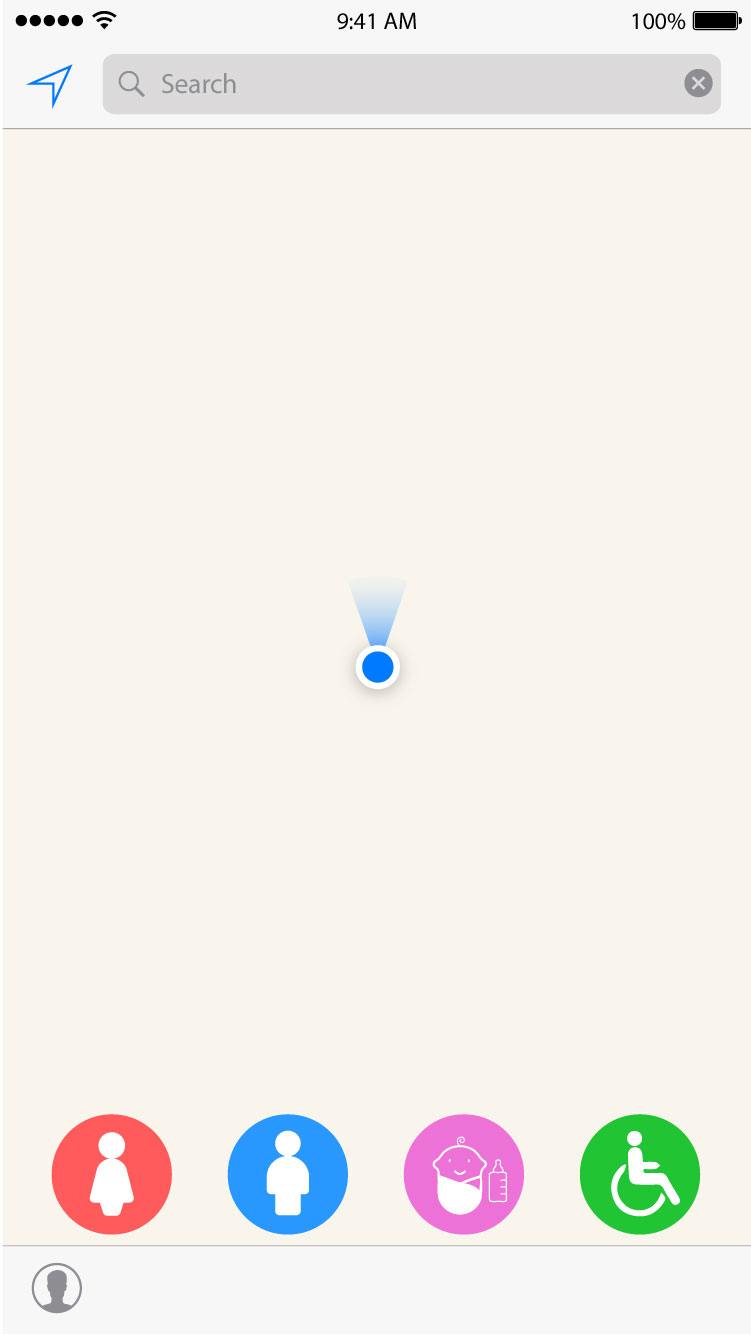
Project 03: Peeple Map-App Map & Wireframes

Group: Ray and Albee

  • Concept

Peeple Map – A Toilet Navigation App

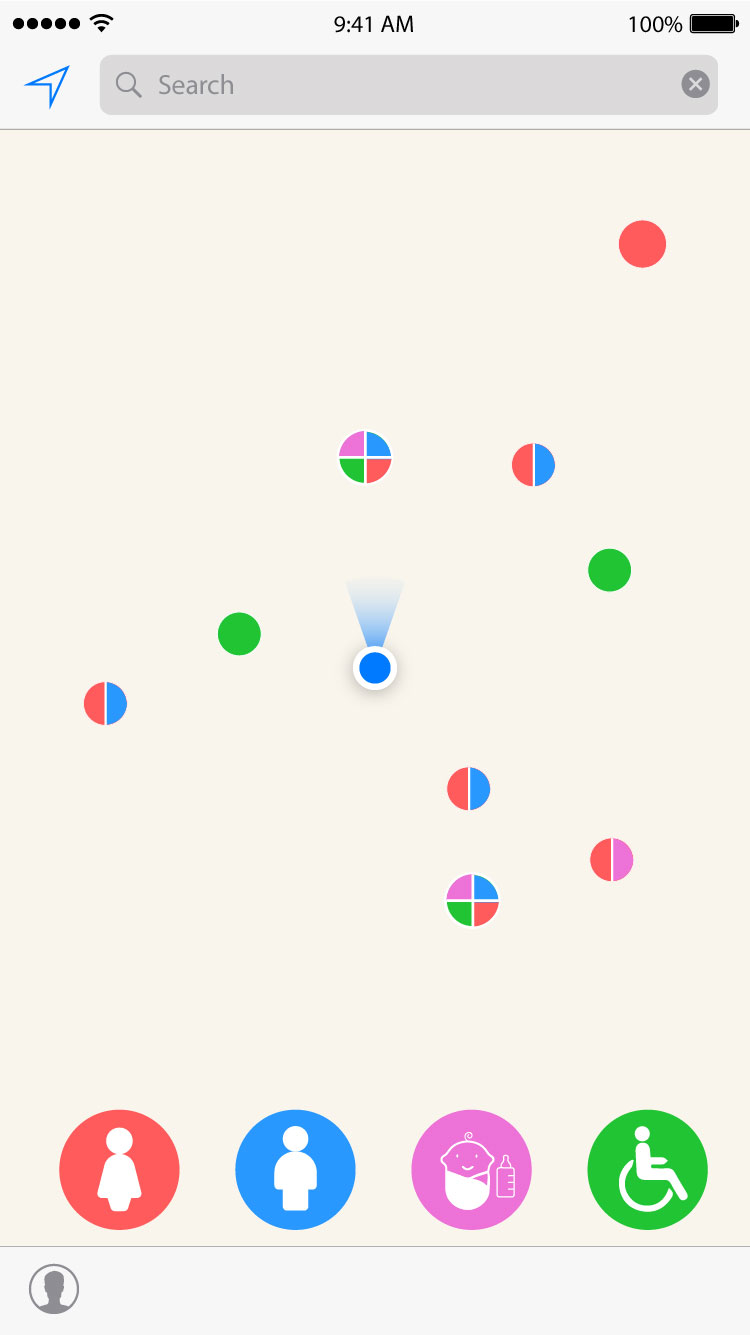
We want to provide a simple way for everyone finding a public bathroom or restroom anytime, anywhere. We also ofter easy search features including by gender, baby friendly and wheelchair friendly. Users with a registered account can also rate  your experience on a toilet you have been. 

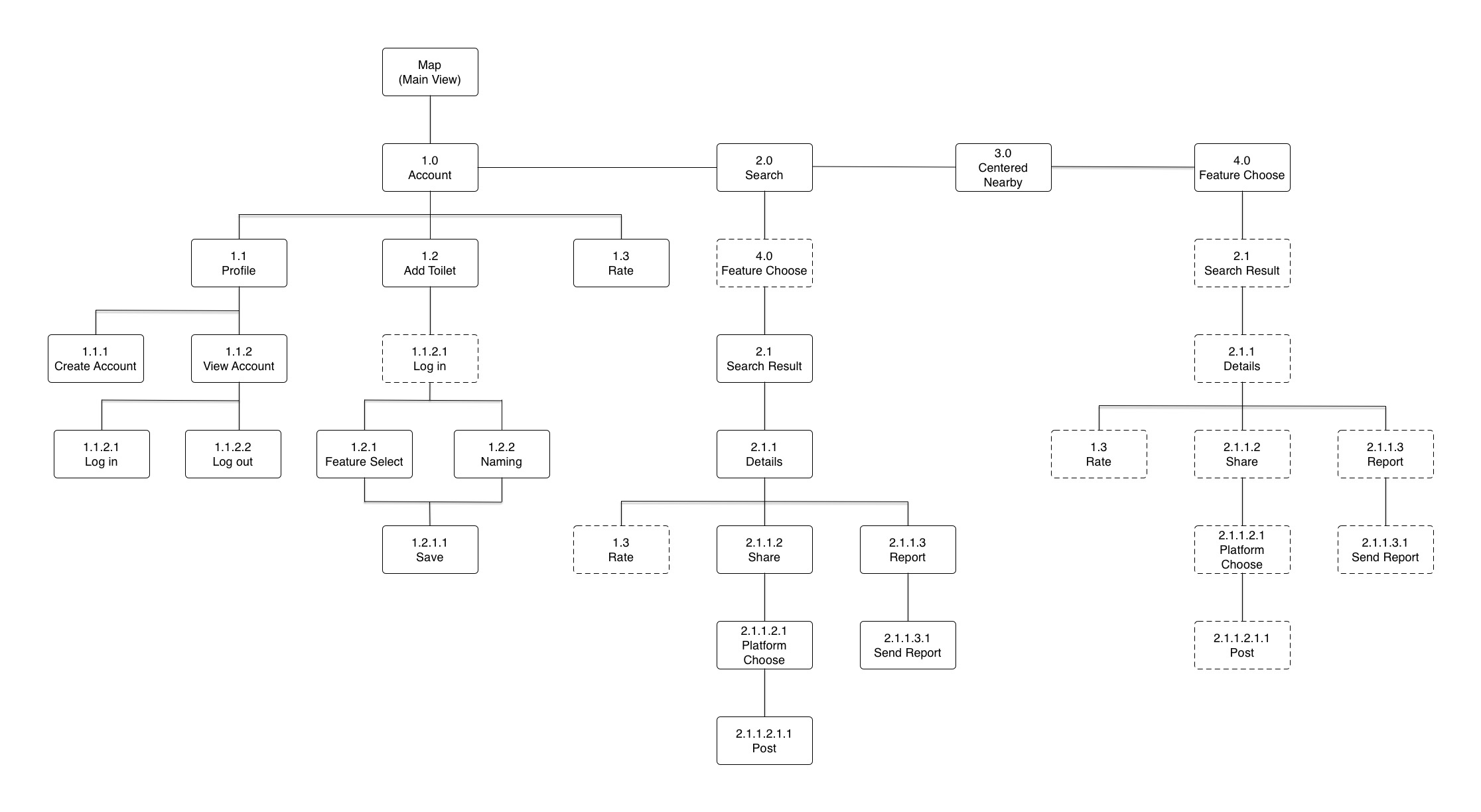
  • App Map

App Map 

  • Wireframe

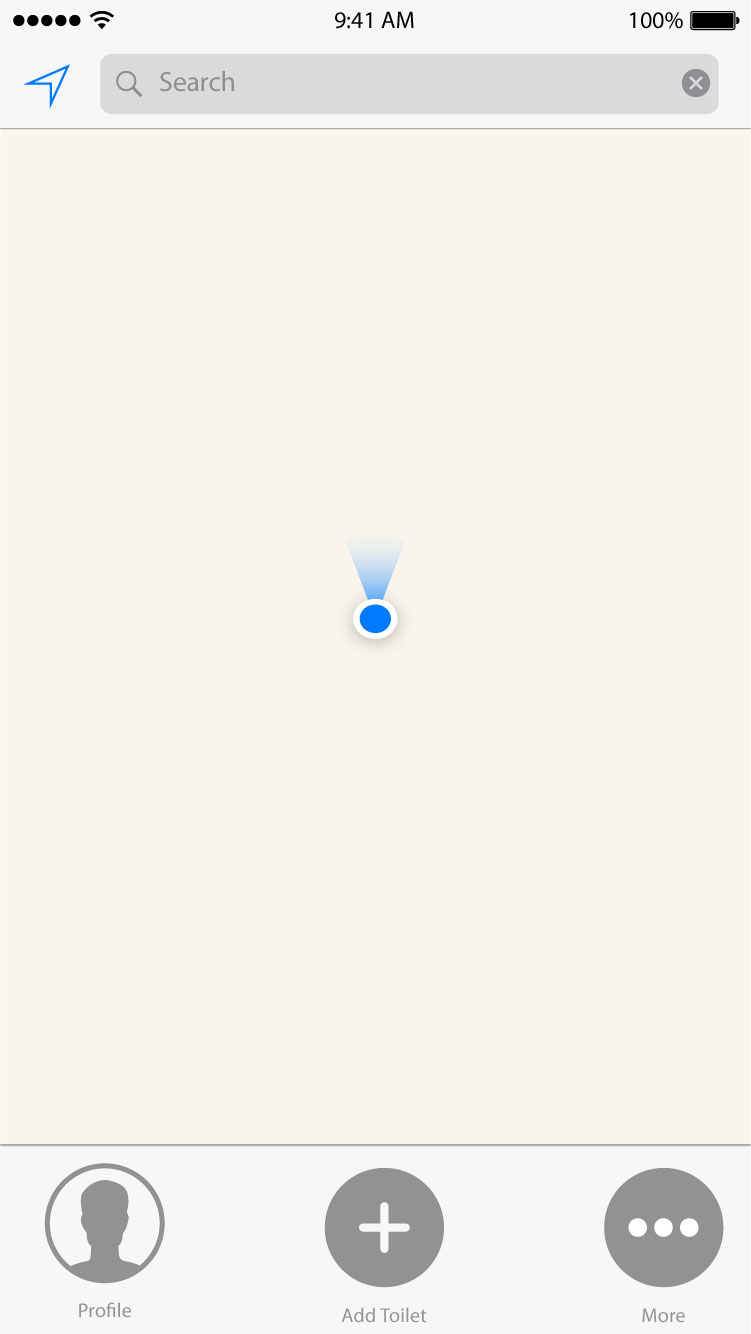
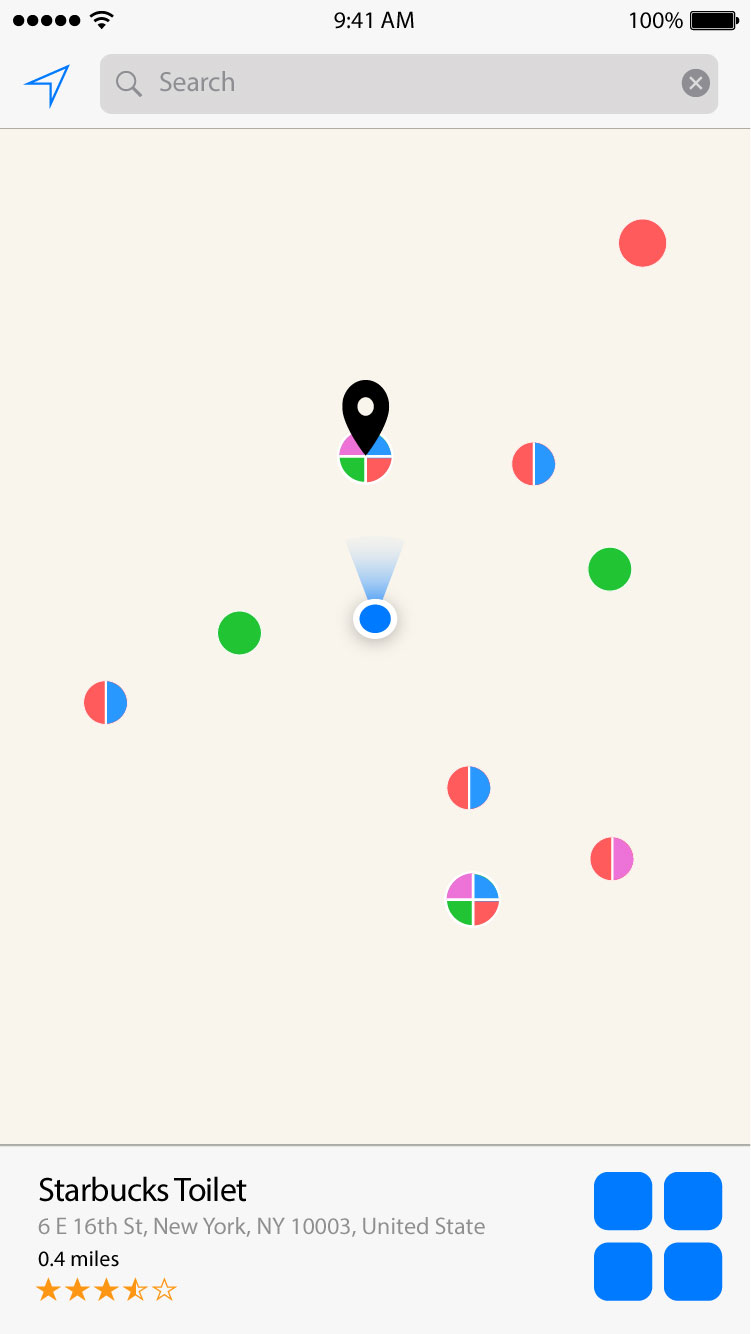
Wireframe_bee_updated-01 Wireframe_bee_updated-02 Wireframe_bee_updated-05 Wireframe_bee_updated-06 Wireframe_bee_updated-08

Wireframe_bee_updated-03

Wireframe_bee_updated-04

Wireframe_bee_updated-08

  • User insight
  1. When I search a restroom, it would be great if I can set a filter to search for a certain range of started restroom.
  2. What is the “More” do under the profile pop-up?
  3. A direction guide will be great.

Douglas and Pengpeng: Stamped

Hi everyone!

Our app is called Stamped,an iPhone app for travelers that allows them to record all the places they have been to and create stories through their camera photo and video library to evoke wanderlust.

These are our first sketches.   Sketches

You can find our wireframes in here: Wireframe Pre

These are things and problems we learned from user tests.

1. For the view of adding locations, what if the user wants to enter a period of time?

2. minimum pictures? what if I just have one? What if I don’t have any? Can I upload them later?

3. The length of the video. What if I choose only 3 photos? How long the video will be? What if I have 100 photos? How long will that be?

4. How to make it simple and light?

5. After editing one small story video, the user got confusing that they don’t know where to tap next. “How can I know that the videos are edited?  I can not know if my editing is working. I also do not know I can skip editing.”

6. How to show the friends that have been to this city? How to show the number? What if there are 30 of my friends have been to London? Will there be a list?

7. How to teach users the difference between big story and small story?

#thursdayplay Rusty Lake Hotel

Hi guys! I just found a nice puzzle game called Rusty Lake Hotel. If you enjoy puzzle games and detective stories like me, you definitely should try this one!

The game tells a weird story that five guests visits the Rusty Lake Hotel. The player is the waiter of the hotel. Every night, you need to solve puzzles to find tools and ways to kill one guest so that other guests can have meat to eat the next day. The style is beautiful too!

Pengpeng